CRE Technology
Interactive Site and Floor Plans: How to Show Availabilities More Clearly on Your Property Pages
Showing availability clearly is not always easy.
For simple listings, a static floor plan or site plan may be enough. But once you’re marketing a multi-floor office building, multi-tenant retail center, industrial park, or property with multiple layouts, static images can quickly fall short.
Prospects want to understand the basics fast:
- What spaces are available?
- Where are they located?
- How do they relate to the rest of the property?
- Is the layout a fit?
That’s why we’ve created new capabilities with the new Interactive Site and Floor Plans so you can make availabilities stand out.

A clearer way to present availability
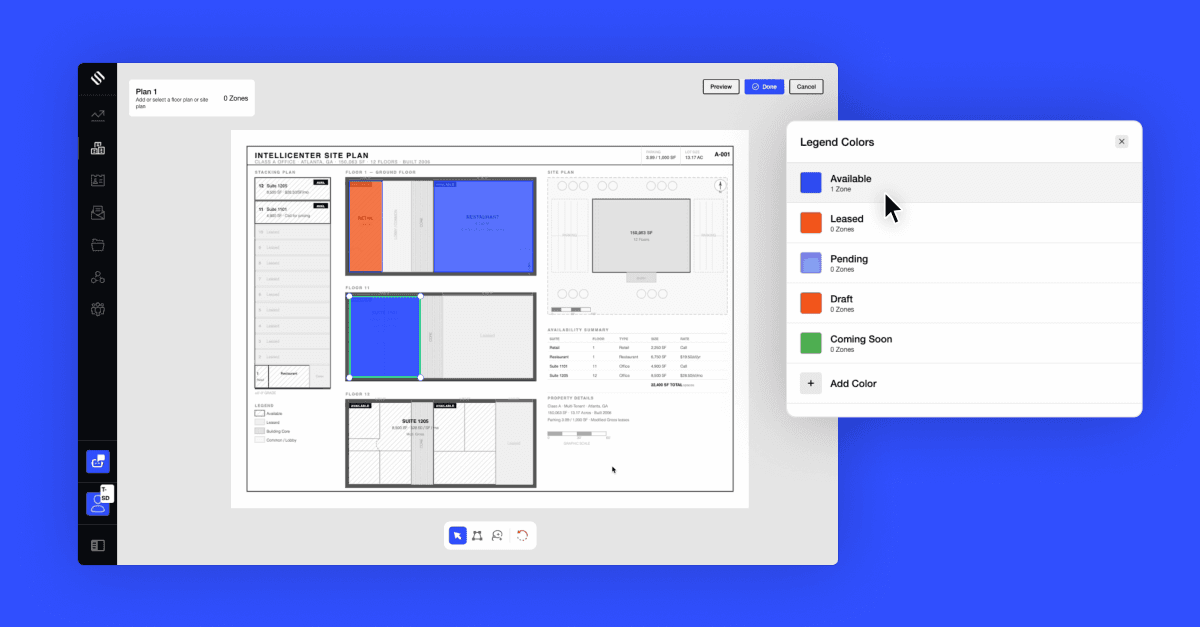
With Interactive Site Plans and Floor Plans, SharpLaunch customers can turn static plans into a more visual, engaging experience for prospects.
Instead of simply uploading an image or attaching a PDF, your team can now highlight available spaces directly on the plan, making it easier for visitors to understand the property at a glance.
Here’s what you can now do:
- Import and edit your site plan
- Add availability zones using polygon shapes or freehand drawing, so you can accurately mark irregular spaces, odd-shaped plots, or any layout that doesn’t fit a rectangle.
- If needed, you can attach multiple site plans to a single property listing, one for each floor, alternate leasing configurations, or across separate buildings. Visitors can switch between views to get the full picture.
- Preview before publishing and see exactly what your visitors will see before anything goes live. Make adjustments without guessing.

This gives your team more control over how availability is presented and gives prospects a clearer way to explore the opportunity before they reach out.
Built for more complex property marketing
Interactive plans are especially useful for property types where layout, location, and adjacency matter.
- Multi-floor office buildings: show each floor as a separate plan, with availability clearly marked per floor
- Multi-tenant retail properties: give visitors a bird’s-eye view of the full plot, then let them drill into individual buildings
- Multi-unit industrial or retail: draw accurate shapes around each unit so availability is unmistakable at a glance
- Alternate leasing layouts: upload multiple configurations to show flexibility without cluttering a single view
If you’ve been working around the limitations of static floor plans, uploading separate images, adding text overlays in design tools, or just hoping prospects will call to ask, this update will improve the buyer experience and so your leads have a better understanding and come to you more qualified.
Why it matters for your marketing
A strong property page should do more than look good. It should help prospects understand the opportunity faster.
Interactive Site Plans and Floor Plans help leasing and marketing teams:
- Make availability easier to understand
- Reduce confusion around layout, location, and fit
- Create a more polished property experience
- Help prospects self-qualify before reaching out
- Present complex properties more clearly
- Reduce reliance on static PDFs and manual design updates
For leasing teams, that means better-informed inquiries.
For marketing teams, it means a cleaner, more modern approach to showcase space for lease.
For prospects, it means less friction when evaluating available space.

Available now in SharpLaunch
The new Interactive Site and Floor Plans tool is available now in your SharpLaunch property pages.
To set it up, go to your property in SharpLaunch, navigate to the site plan section, and import your existing floor plan or start from scratch. From there you can draw your availability zones, add multiple plans if needed, and preview before publishing.
If you need help getting set up, contact our team.
Not a SharpLaunch customer yet? If you’re not yet a SharpLaunch customer and want to see how it works for your specific property portfolio, book a demo.

Related Blog Posts
Marketing Best Practices
10 Reasons Why You Need a Property Management Website
As the global pandemic continues to drive astonishing advances in digital life, the commercial...
Marketing Best Practices
5 Dreadful Mistakes That Can Kill Your Property Listings
Your commercial real estate website has approximately 10 seconds to make an impact on a...
Marketing Best Practices
5 Proven Strategies to Capture More Leads from Your Property Listing
Are you missing out on potential clients and sales by not effectively capturing leads from...